
Add a task
Add a task in BossMode with a date, time, duration, priority and project.
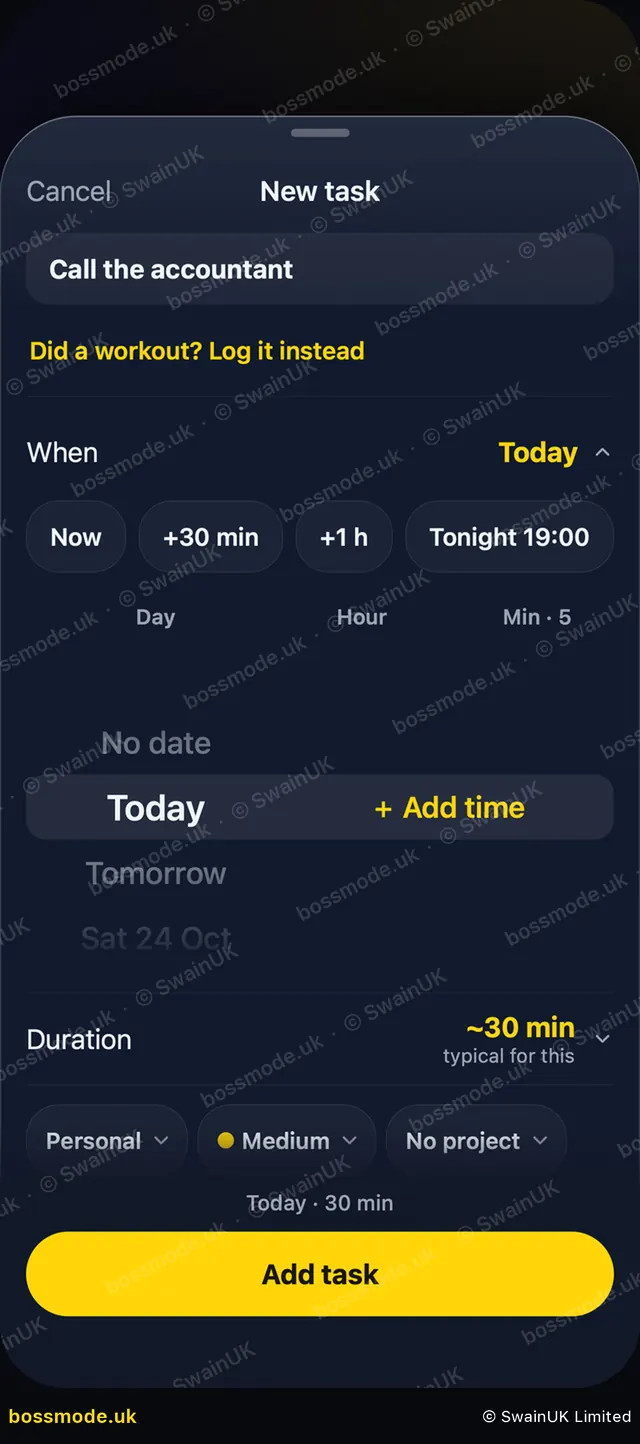
- On Today, tap the gold + at the top. The New task sheet opens.
- Type what you need to do, for example "Call the accountant".
- Under When, tap Now, +30 min, +1 h or Tonight 19:00, or scroll to a day and tap + Add time.
- Under Duration, set how long it takes. The AI Boss uses this to plan your day.
- Use the chips below to set the type (work or personal), the priority (for example Medium) and the project.
- Tap Add task. It shows on Today in time order.
You can also ask the AI Boss to add a task for you, by typing or speaking, for example "Remind me to call the accountant tomorrow at 10".
To change a task, tap it. The Edit task sheet opens, with Mark done and Start at the top. Make your changes and tap Save.
Tasks that come from your Google Calendar (for example an invite from someone else) stay in your calendar. Ticking one done in BossMode, or BossMode tidying it away later, never deletes the event.
Was this helpful?
Still stuck? Contact us
We answer within 2 working days (UK office hours).
Contact us