
Self Assessment figures (SA100 and SA103)
See your self-employed turnover and allowable expenses laid out box by box, ready to copy into your return.
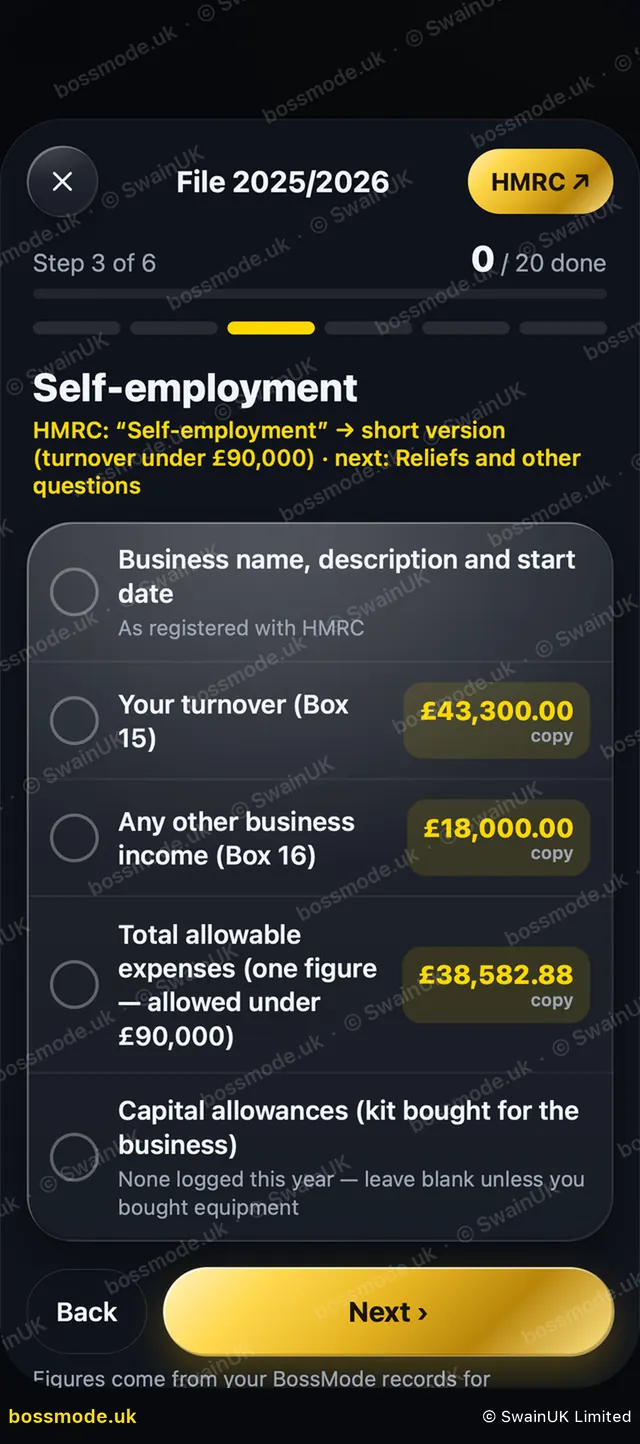
If you are self-employed, BossMode lays out your Self Assessment (SA100) figures, including the self-employment pages, box by box, with a copy button by each one. Turnover under £90,000 can use the short self-employment pages (SA103S); above that you use the full pages (SA103F).
- Run Money → Check your books first, so duplicates and categories are right.
- In Money, tap Tax return.
- Tap Personal (SA100) and pick the tax year, for example 2025/2026 (6 April to 5 April).
- Read the step-by-step list, then tap Start filing mode.
- Go through each step. On Self-employment, tap a figure, such as your turnover (box 15), to copy it, then paste it into the matching box on GOV.UK.
- Tick each item as you go. Tap Next to move on.
You file on GOV.UK: Log in and file your Self Assessment. Online returns are due by 31 January after the tax year ends.
BossMode does not file anything with HMRC. You file your own return on GOV.UK, or your accountant does. BossMode is a guide, not tax advice. Check your figures with your accountant before you file.
Still stuck? Contact us
We answer within 2 working days (UK office hours).
Contact us